
Reports cards will be mailed home next week, and you can expect information regarding student schedules to be mailed in August.
Links to end of the year events and photos will also be sent out via email soon!
As many of you know, this school year marks my final year serving as Principal of Waverly High School. While I am excited to begin a new role within the district as the School Business Administrator, leaving this principal position is bittersweet. It has been an honor to serve the students, families, and staff in this role since 2015.
Beginning next school year, John Cheresnowsky will serve as High School Principal. I know he will do an outstanding job leading our school and supporting our students and families. Ernie Marilley will remain as the High School Assistant Principal, as well.
We wish Mrs. Jackie Picco the best, as she transitions into a Principal role at Elm Street Elementary!
Even though there are lots of changes, the faces are still the same, we're here to support our kids, and we're all still on the same TEAM! Go Wolverines!
On behalf of the entire Waverly High School staff, thank you for your support throughout the year. We wish you and your family a safe, relaxing, and enjoyable summer. We look forward to welcoming students back in September for another great year.
Warm regards,
Ashlee Hunt
The skies should clear and we will be outside!
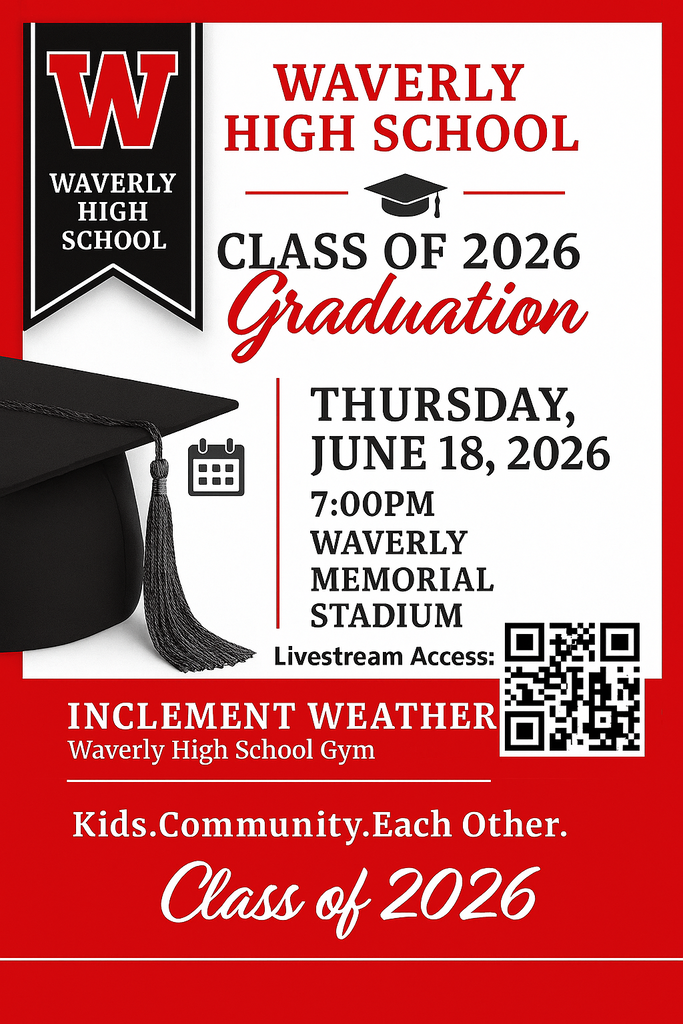
Waverly Memorial Stadium- 7pm
Link to Livestream:
https://www.youtube.com/@WolverineNewsNetwork2025/streams
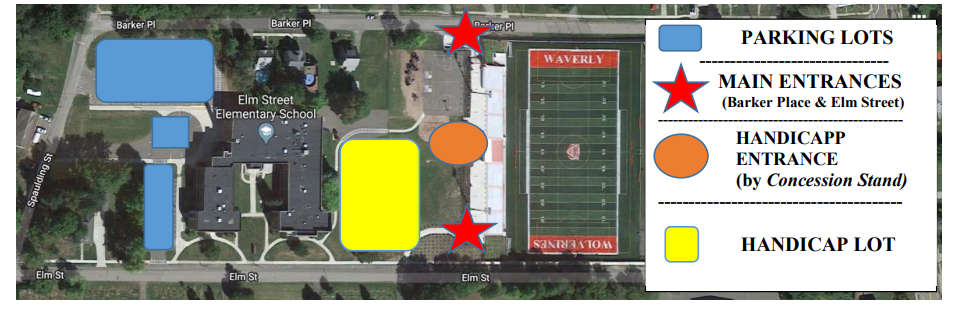
See additional post for parking and traffic flow information.


Any high school student that took a TC3 or CCC dual enrollment ONLINE course in the Fall , Winter or Spring Semester, must submit their final grade to the Guidance Department for it to be added to their transcript. Online final grades are due by Monday, June 22nd. Students can submit grades via email as a screen shot or attachment. If Guidance does not have final online grades submitted, we are unable to add them to the transcript. This does NOT include dual enrollment courses that are taken on campus concurrently at Waverly.
Please see your Guidance Counselor if you have any questions.


Parking and Traffic Flow for Graduation at Waverly Memorial Stadium:
Graduates must park at the bus garage.
Administrators and Board members may park in the small lot across from the bus garage or at the bus garage.
Guests with limited mobility or in need of assistance will be allowed to park in the new Elm Street School Parking Lot (on the top) next to the stadium. Parking lot access is located on Elm Street, across from the cemetery. You must have your tags visible to park. Entrance to this lot will be limited and staffed for entrance. There will be no traffic flow in the alley behind Elm St. School.
The lot on the west side of Elm St. School is accessible to all.
The lot behind Elm street school is available to all.
The overflow lot in the field off Barker Place is available to all.
Cayuta Avenue, Elm Street, and Barker Place will permit on street parking.
Be aware that traffic on Barker Place will be one way heading eastbound toward Cayuta Ave. and traffic on Elm Street will be one way heading westbound towards Spaulding Place.
We had a very successful last day today! The senior walkthrough, car parade, and picnic went off without a hitch! Our underclassmen spent the afternoon "moving up"- and we begin Regents testing tomorrow for grades 9-12. Students only attend for testing purposes.
BOCES Completion ceremonies are being held tomorrow (Wednesday) on the Bush Campus. Emails were sent to students/families regarding times and location.
All seniors must attend WAVERLY Graduation Rehearsal in the HS gym starting at 8:30am Thursday morning.
We will go to the stadium for practice after the gym rehearsal, and should be done by 10:30am.
A decision regarding outside or inside graduation will be made on Thursday around noon.



Attention ALL High School students and families:
It's been a busy week!
We hope the seniors are having a great time in Lake George, NY!
Class of 2026 families- keep watching your email- as we have photos and links to various events we will be sharing!
Next week:
Monday, June 15- 6pm- All Sports Awards Banquet- HS Auditorium
Tuesday, June 16- Last day of HS classes, Senior Celebration day
8:00-8:30 Seniors arrive, get their caps & gowns on, line up in HS main lobby
8:30-8:45 Procession through MS/HS- load buses in front of HS
8:45-8:55 Transport to Elm St
9:00-9:10 Procession through Elm St
9:15-9:25 Transport to Lincoln St
9:30-9:45 Procession through Lincoln St.
9:45 Return to HS track
9:50 Picture of all seniors in cap and gowns at the track bleachers out back
10:00-10:45 Decorate cars in old bus lot
11:00-11:20 Car parade
11:30 Senior Picnic at East Waverly Park
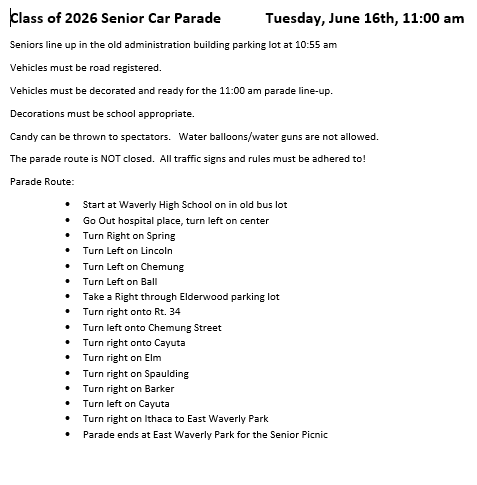
The route for the car parade is attached.
Wednesday, June 17- Regents testing, BOCES completion ceremonies at GST
Thursday, June 18- Regents testing, Graduation Rehearsal- 8:30-10:30am stadium
GRADUATION- Thursday, June 18- 7pm- Stadium- see invitation attached
Friday, June 19- Holiday- NO SCHOOL/TESTING

We have just been notified by GSTBOCES that they will NOT be holding completion ceremonies (BOCES graduations) tomorrow as scheduled due to potential weather. Instead, the ceremonies will be held on Wednesday, June 17th. This is in conflict with our Waverly Graduation Rehearsal.
Therefore, we have moved Waverly Graduation Rehearsal to Thursday, June 18th at 8:30am at the stadium.
Waverly Graduation will still be that evening, June 18th, beginning at 7pm. More details will be out soon!
A schedule of the GST BOCES ceremonies was emailed directly to those students and families affected for the June 17 event.

June 2026
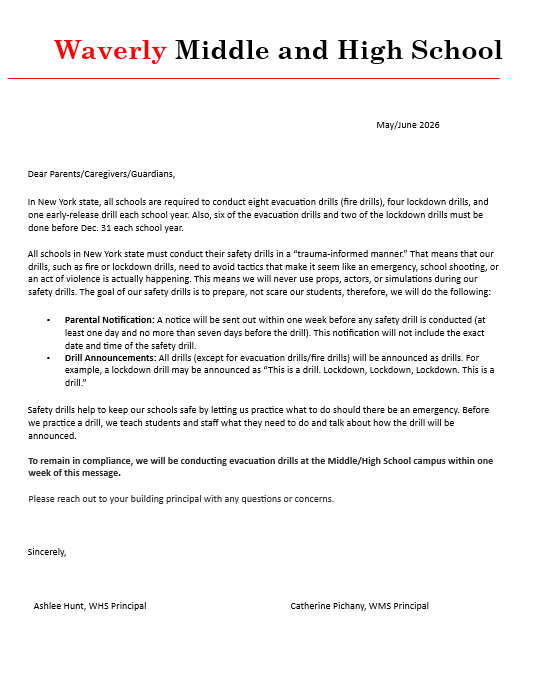
Dear Parents/Caregivers/Guardians,
In New York state, all schools are required to conduct eight evacuation drills (fire drills), four lockdown drills, and one early-release drill each school year. Also, six of the evacuation drills and two of the lockdown drills must be done before Dec. 31 each school year.
All schools in New York state must conduct their safety drills in a “trauma-informed manner.” That means that our drills, such as fire or lockdown drills, need to avoid tactics that make it seem like an emergency, school shooting, or an act of violence is actually happening. This means we will never use props, actors, or simulations during our safety drills. The goal of our safety drills is to prepare, not scare our students, therefore, we will do the following:
• Parental Notification: A notice will be sent out within one week before any safety drill is conducted (at least one day and no more than seven days before the drill). This notification will not include the exact date and time of the safety drill.
• Drill Announcements: All drills (except for evacuation drills/fire drills) will be announced as drills. For example, a lockdown drill may be announced as “This is a drill. Lockdown, Lockdown, Lockdown. This is a drill.”
Safety drills help to keep our schools safe by letting us practice what to do should there be an emergency. Before we practice a drill, we teach students and staff what they need to do and talk about how the drill will be announced.
To remain in compliance, we will be conducting evacuation drills at the Middle/High School campus within one week of this message.
Please reach out to your building principal with any questions or concerns.
Attention Seniors! If you are looking for a job after graduation, CVS is holding a Hiring Event tomorrow, June 10th, from 12 PM to 5 PM at their warehouse in Waverly, NY. You must be 18 to attend, and the dress code is casual but presentable. Permission slips are required, and transportation can be provided if needed. For more information, see Mrs. Cole or Mr. Clark in Room 151.

Click on the link for directions supplied by the Technology Department on how to save your files!!
https://gstbocessscta-my.sharepoint.com/:b:/g/personal/ahunt_wcsdletsgo_com/IQBevIyIlTw5S6csf--vcXQ-AQdRtoGlSKtemyxiIzjCsSw?e=agJnB4

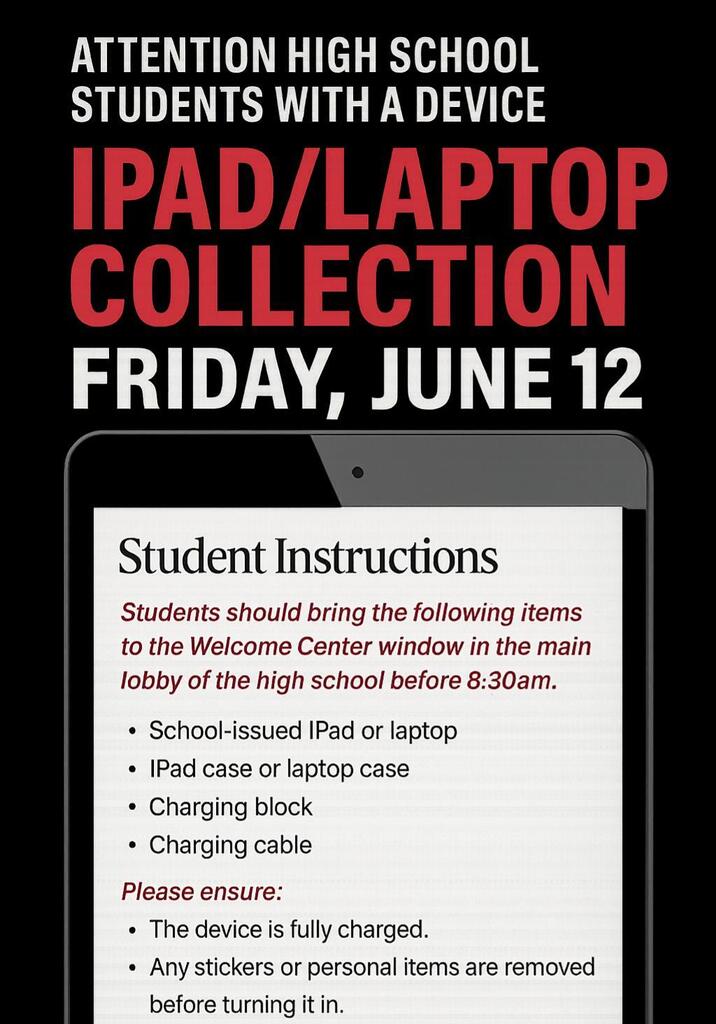
ATTN: Grade 9/10, and any student with an Ipad- collection will be held this Friday!
See the attached flyer for more details!
ATTN: Any student in Gr. 11/12 or with a loaner laptop, should return the device to a laptop charging station in the main office or a junior/senior classroom.
Do You Have an Eye for Design?
Want to Win $200 in Gift Certificates?
Then The Den has a project for you!
We’re giving our space a fresh new look, and we want student designers to take the lead. Your mission: help us transform The Den into a true coffee‑shop vibe that students will love.
With a $5,000 budget, YOU get to design the Den the way you imagine it.
Submit your design ideas by June 15th.
See Mrs. Cole or Mr. Clark in The Den for details.
Show off your creativity
Build your portfolio
Leave your mark on Waverly High School
Let’s make The Den the coolest spot on campus!
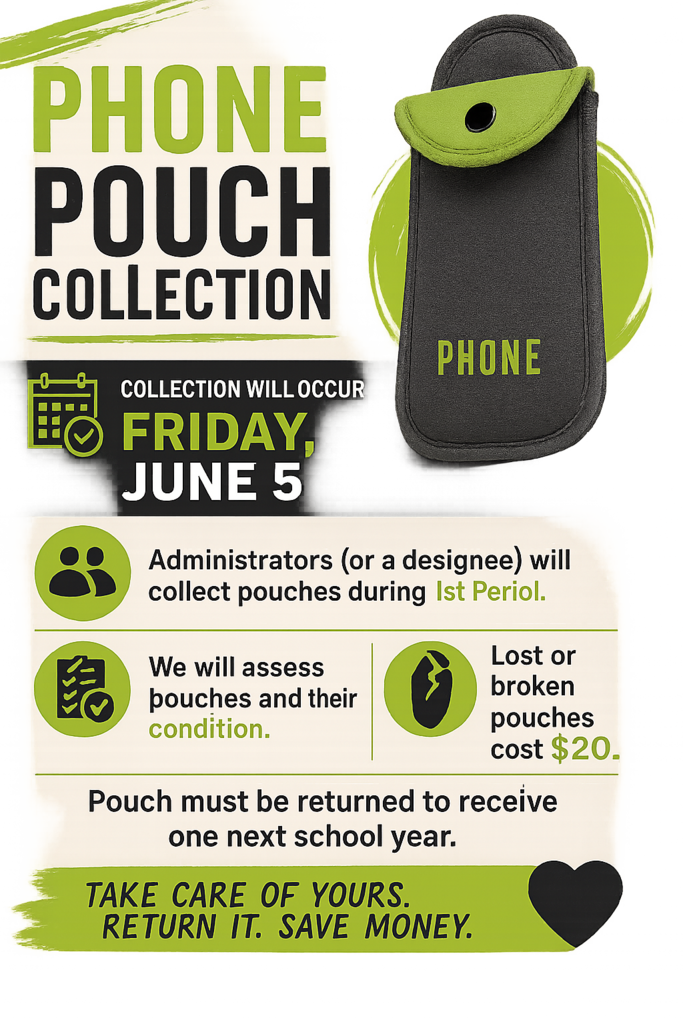
We will begin to collect pouches that have been assigned to students this Friday!
On Friday, a staff member will have a collection box set up in the welcome center window in the main lobby of the high school.
As pouches are turned in, students will be checked off the list.
A pouch was assigned to all high school students on September 16, 2025 with an assigned number.
This pouch will be required to be handed in prior to the last day of school, or the student will incur a replacement charge of $20.
Please understand that our building is still required to maintain a distraction free learning environment for the remainder of the school year. We ask that any devices- phones, tablets, air pods, headphones, etc- are stored in lockers or backpacks during the school day.
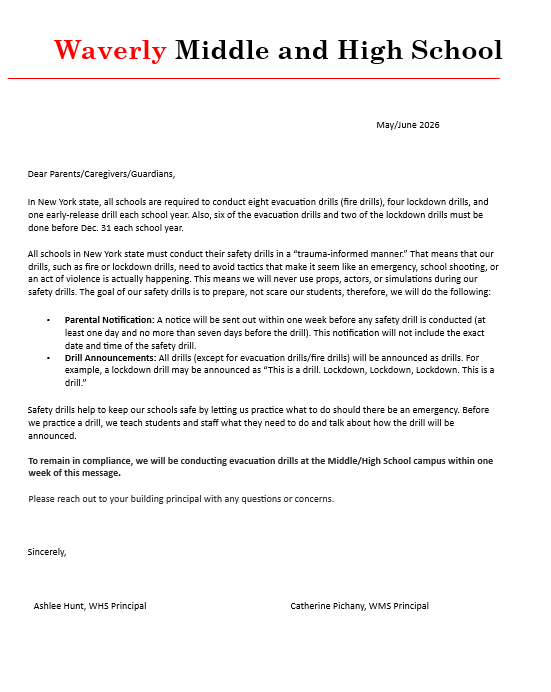
May/June 2026
Dear Parents/Caregivers/Guardians,
In New York state, all schools are required to conduct eight evacuation drills (fire drills), four lockdown drills, and one early-release drill each school year. Also, six of the evacuation drills and two of the lockdown drills must be done before Dec. 31 each school year.
All schools in New York state must conduct their safety drills in a “trauma-informed manner.” That means that our drills, such as fire or lockdown drills, need to avoid tactics that make it seem like an emergency, school shooting, or an act of violence is actually happening. This means we will never use props, actors, or simulations during our safety drills. The goal of our safety drills is to prepare, not scare our students, therefore, we will do the following:
• Parental Notification: A notice will be sent out within one week before any safety drill is conducted (at least one day and no more than seven days before the drill). This notification will not include the exact date and time of the safety drill.
• Drill Announcements: All drills (except for evacuation drills/fire drills) will be announced as drills. For example, a lockdown drill may be announced as “This is a drill. Lockdown, Lockdown, Lockdown. This is a drill.”
Safety drills help to keep our schools safe by letting us practice what to do should there be an emergency. Before we practice a drill, we teach students and staff what they need to do and talk about how the drill will be announced.
To remain in compliance, we will be conducting evacuation drills at the Middle/High School campus within one week of this message.
Please reach out to your building principal with any questions or concerns.
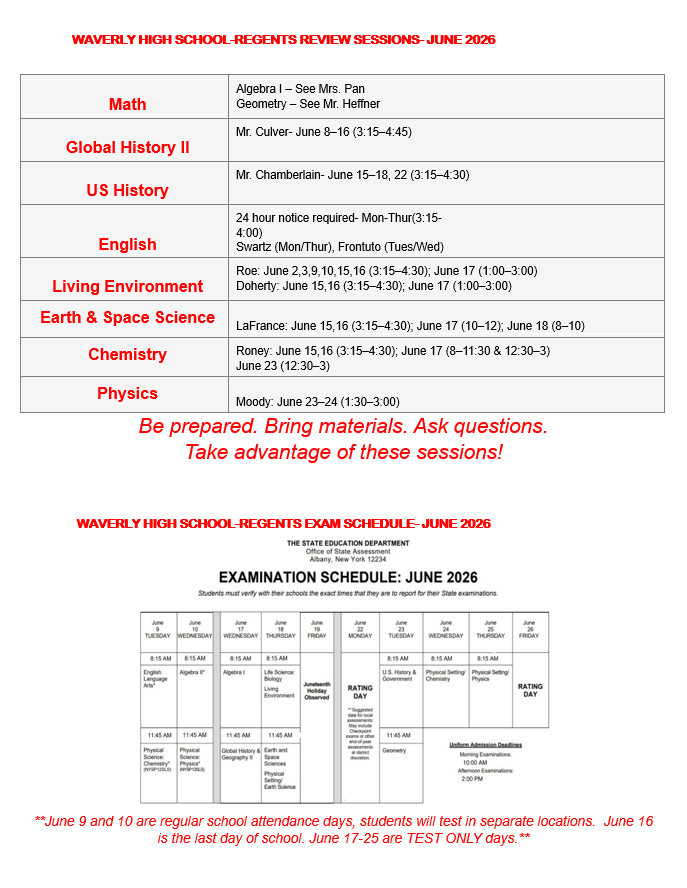
Please see attached.
Reach out to the main office or guidance if you have any questions.
Happy Memorial Day weekend!
See everyone on Tuesday!

Requesting Final College Transcripts - Class of 2026 - Important Information
Any Senior that accumulated College credits through Corning Community College or Tompkins Cortland Community College must request that their final transcripts be sent to the college they will be attending in the Fall. The student must make this request and complete the process. For college credits to be accurately transferred, it is important that this is completed.
If a Senior is attending a College or University, high school final transcripts will be sent to his/her College and students do not need to contact the Guidance Department. If a Senior has changed his/her post-graduation plan or changed Colleges/Universities from what we have on file, this information will need to be shared with Guidance so that a final transcript can can be sent to the appropriate institution. All final high school transcripts are sent to Colleges/Universities after July 1st.
Tompkins Cortland Community College Credits:
If a student is going to TC3 they don’t need to request a final transcript.
Students should hold off on requesting their official transcript until all of their grades have been posted. It is suggested July 1st.
For students earning their Associate’s degree through the Early Degree program, their degree won’t be shown on their transcripts until late August/early September.
If students need their username and/or password, please send a text to Rhonda Kowalski at 607-367-6828 for assistance.
Students joining the military should get a copy of their transcript as well as it helps with rank.
Directions
Log in to myTC3
The email will be what the system sees as their TC3 email – not your gmail, icloud, school, etc. email.
Username@mymail.tc3.edu
If students need a password reset email students should text Rhonda Kowalski.
Select “Self-Service”
Re-Enter their Username
Hover over Grades
Select “Request Official Transcript”
Follow the directions to order their transcript through Parchment
Official transcripts are $8 per request.
Alternate Directions
If a student doesn’t want to log in they can request their transcript at https://www.tompkinscortland.edu/academic-records/transcripts and click the link under “online orders”.
Corning Community College Credits:
Students should visit https://aptg.co/NCvPlv for ACE Student-Academic Transcript Request Directions.
ACE students will need their CCC ID or Social Security number to request a transcript. Call the ACE office to get your CCC ID: 607-962-9491 or 607-962-9533.
A credit card will be required to cover the $8.00 charge per request.
If you are uncomfortable placing an order over the Internet, Parchment will place your transcript request for an additional operator surcharge for placing orders over the telephone.
**Important –ACE Students ONLY need to wait until all grades are entered by their high school instructors. Please check the box "ACE Students ONLY - Hold for Grades" when submitting the request. Call the ACE office at 607-962-9491 if you need help logging in.
If you need assistance or your CCC ID# – please email ACE at ace@corning-cc.edu or call 607-962-9533 or 9491


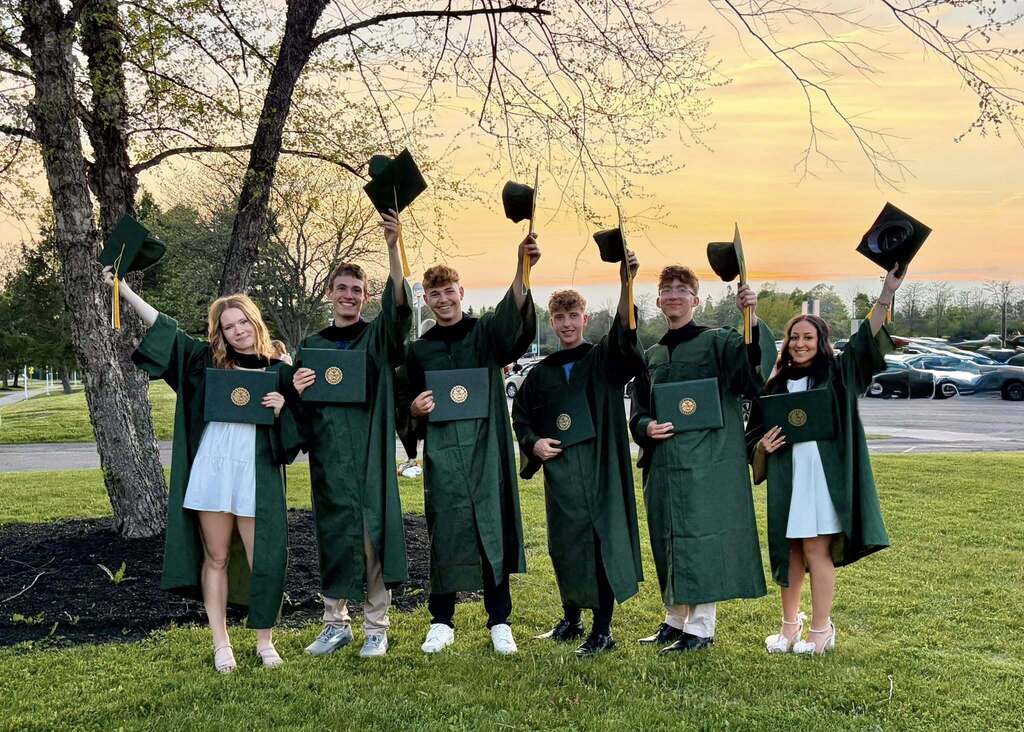
Photo credits: Jessica Chamberlain/Theresa Robinson
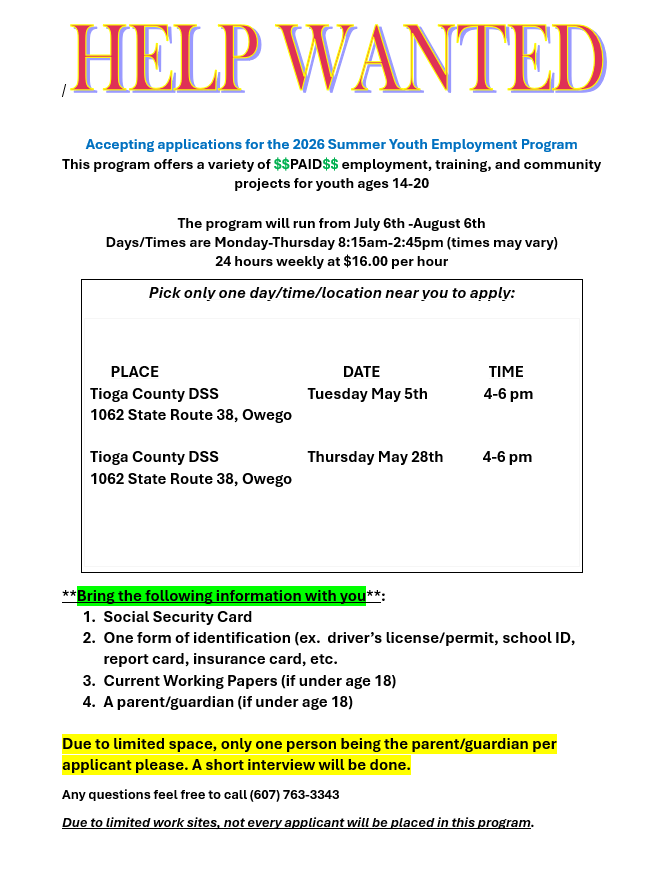
The Summer Youth Employment Program is looking for workers.
See the attachment for more details to see if you qualify!
Interviews are next week on Thursday, May 28th.
If you need more information, stop by the Career Center in Room 151.